
Integrations
Apple Calendar integration for your AI phone assistant
Appointments booked over the phone land in the calendar you already use on iPhone, iPad and Mac. And the assistant offers only free slots.
Apple Calendar
What it does
Creates events
Every appointment booked over the phone becomes an event in your calendar.
Reads availability
The assistant offers only the times when you are free.
Updates and moves
If the customer calls back to change the time, the event is updated.
On all your devices
You see it on iPhone, iPad, Mac and Apple Watch, with your usual notifications.
How to connect it
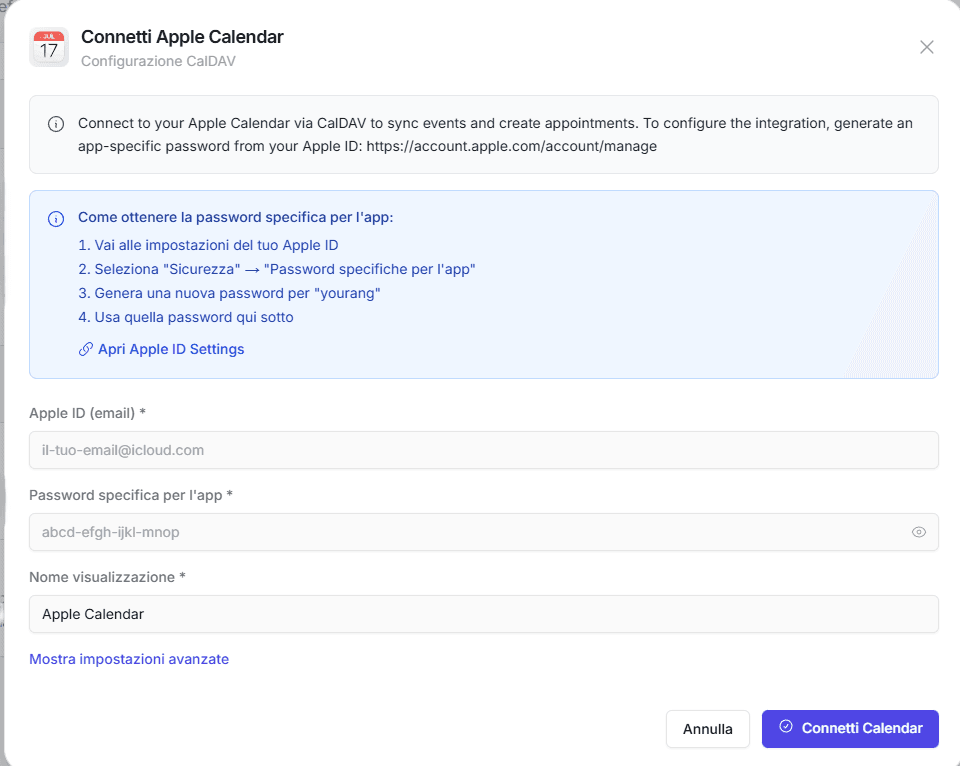
- 01In the yourang.ai dashboard, open Integrations and choose Apple Calendar.
- 02Generate an app-specific password from your Apple account.
- 03Enter your Apple ID and the app-specific password in yourang.ai and choose the calendar.
Use cases
Calendar on iPhone
If you work with your iPhone in your pocket, you see the new appointment as soon as it is booked.
Several people
One calendar for each person on the team, each with their own appointments.
Native notifications
Reminders and alerts come from the Apple apps, with nothing else to install.
Connect it and hear it at work.
Book a demo: we set it up with your tools and you try it with a real call.