
Integrations
n8n integration for your AI phone assistant
One node to start calls and read the history, one trigger that fires when a call ends. You build the rest, on your own servers too.

n8n
Official community node
Open source and published on npm: install it from Settings › Community Nodes. It ships two nodes: yourang, to start calls and read the call history, and yourang Trigger, which starts your workflow when a call ends.
n8n
What it does
Workflows from calls
A workflow starts when a call begins, ends or generates an event.
Data to process
Transcripts, summaries and collected data, ready for your logic.
Connected to everything
Databases, internal tools and the hundreds of n8n integrations.
Both ways
Your workflows can update the assistant's context and settings.
Real case
Every call analysed and saved to Google Sheets
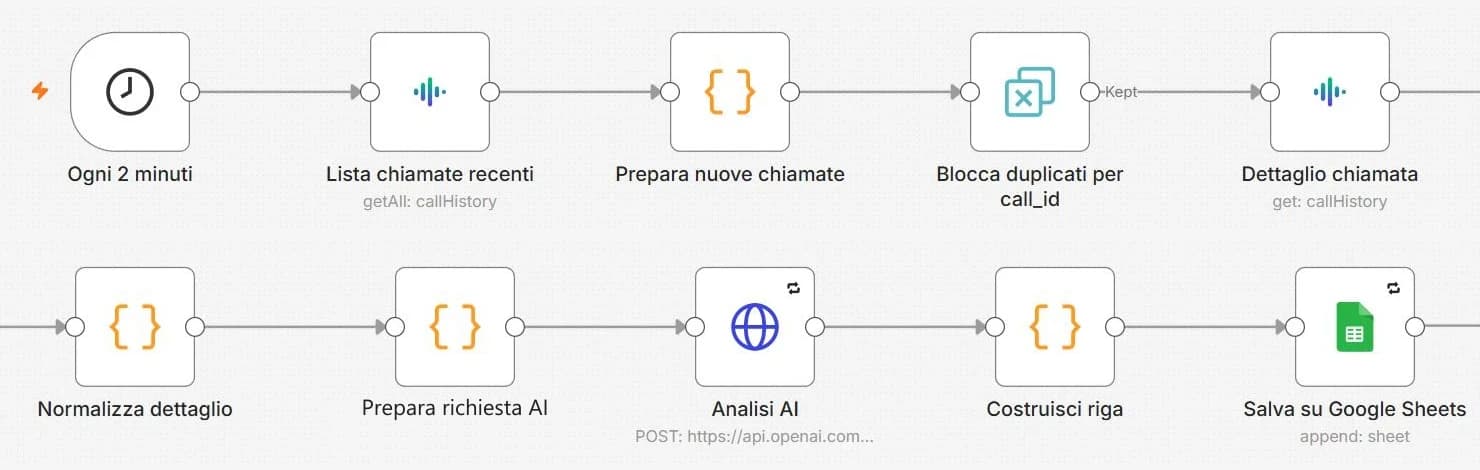
The workflow of a real estate agency we work with: every 2 minutes the yourang node reads completed calls, AI classifies them (appointment booked, lead interest, call back) and each call becomes a row in the agency's sheet.
Installation
How to install the yourang node
Access n8n
Log in to your self-hosted n8n instance or n8n Cloud account.
Install the community node
Go to Settings > Community Nodes, click Install, and search for 'n8n-nodes-yourang'.
Get your API Key
Log in to the yourang.ai dashboard and copy your API key from the settings section.
Create credentials
In n8n, go to Credentials > Add Credential > yourang and paste your API key.
Use cases
Custom CRM logging
Format call data exactly how you need it and send it to your proprietary or custom CRM system.
Multi-step notifications
Send alerts to Slack, Email, and SMS simultaneously with different content based on call outcome.
AI Agent Handover
Use n8n to make decisions on whether to hand over the call to a human agent based on complex rules.
Related integrations
Connect it and hear it at work.
Book a demo: we set it up with your tools and you try it with a real call.